A cinema chair can look adjustable while hiding a fixed or limited lumbar system. The control may sit beneath the seat, beside the armrest, or behind a plastic cover. Sometimes the lever moves, but nothing happens. That matters. Before assuming the chair is broken, check whether it has a lumbar control at all; many theater seats use a fixed backrest designed for broad, short-term use.
The search question “why cant i adjust the lumbar support on my cinema chair” has several practical answers: a locked mechanism, a jammed cable, a weight-activated feature, or a control that changes recline rather than back support. The World Health Organization’s 2023 low-back-pain fact sheet estimated that 619 million people experienced low back pain in 2020. That figure does not prove a cinema seat caused anyone’s discomfort, but it shows why back support deserves attention. A seat that presses into one spot can feel very different after a two-hour film.
Ergonomist Alan Hedge, Professor Emeritus at Cornell University, has published guidance on fitting chairs to users and tasks. A verified, verbatim Hedge quote about cinema-chair lumbar controls was not available, so attributing one would be misleading. His broader ergonomic guidance points to a useful question: does the chair fit your body, or only its design? Small parts fail. A loose knob, stiff slider, or uneven cushion may be the clue. This guide examines ten common reasons the support will not move, along with simple checks and signs that the mechanism may need service.
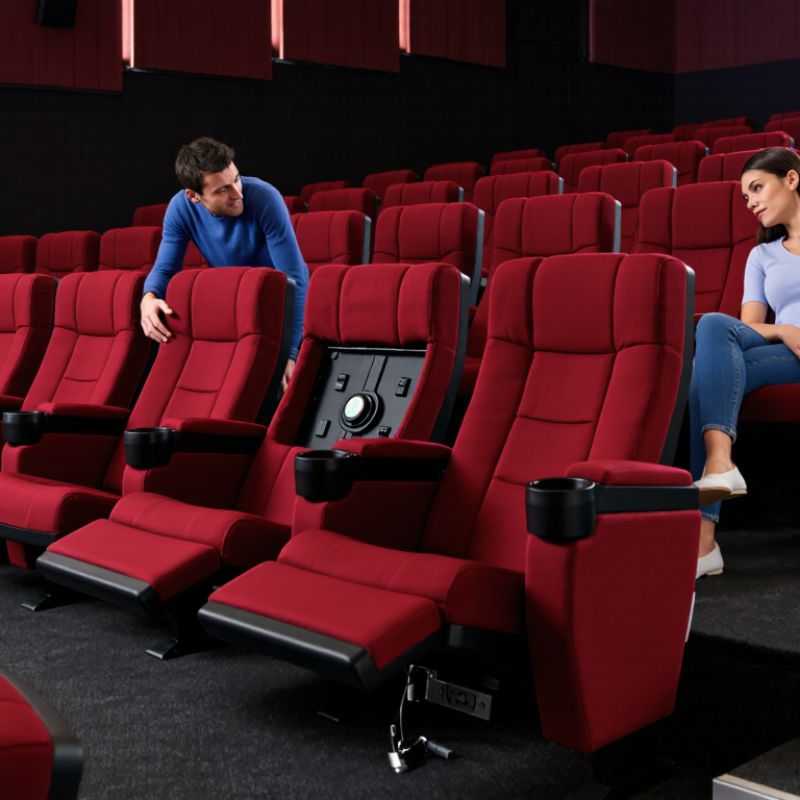
Cinema-chair lumbar systems are designed around recline, compact frames, and shared use. Many use a fixed, shaped backrest rather than a movable lumbar pad. Others hide adjustment behind the upholstery or inside the side panel. The mechanism may move only with the whole backrest. That can feel like no adjustment at all.
OSHA’s Computer Workstations eTool advises fitting lumbar support to the lower back and keeping about 2–4 inches between the seat edge and the backs of the knees. That clearance matters: a seat that is too deep can push the pelvis forward, making lumbar support harder to feel.
Check for a small lever, a sliding panel, or a tension control near the seat sides. Move slowly while reclined; some controls work only when the backrest is upright. ISO 9241-5:1998 also treats adjustable backrests as an ergonomic workstation consideration, though cinema seating may offer fewer settings than office chairs.
If the lower-back pad feels fixed, the design may simply have no user control. Not every chair adjusts. And upholstery can disguise the mechanism.
A cinema chair’s lumbar support may seem stuck because its control is locked, disconnected, or under pressure. Check whether a nearby lever, button, or rotary knob has a separate release position. Some controls must be held while the support moves. That detail is easy to miss.
Look for a small lock switch beside the armrest or under the seat. If it is engaged, the adjustment control may move without changing the backrest. A loose cable can cause a similar symptom: the knob turns, but the lumbar pad stays still. Listen for a click and watch for even movement. Do not force the control; plastic parts and internal linkages can crack. If the chair is occupied, ask the person to stand before inspecting underneath.
A jam can also come from a trapped coat, debris, or a cushion pressed tightly against the mechanism. Clear visible obstructions, then test the control gently through its normal range. If it still will not adjust, stop and check the chair’s maintenance instructions or contact a qualified technician. Repeatedly twisting a stiff knob is tempting, but it can make a small fault worse. The mechanism may not be the only problem. A control that works intermittently deserves attention, even if the support moves again after a few tries.
Cinema chair lumbar support can stick when its adjustment cable loosens, bends, or slips from the linkage. In manual models, a worn gear or jammed pivot may leave the backrest fixed in one position. A faint click from the side panel can point to a mechanism that is moving but not engaging. Don’t force the control; that can strain the cable or crack a plastic fitting.
Powered supports have different failure points. A loose connector, damaged wire, weak power supply, or failed switch may interrupt the motor. Some motors stop when a limit switch signals that the support has reached its travel limit. If the motor hums but the cushion does not move, the drive or linkage may be jammed. Silence is less conclusive. It could mean lost power, a faulty control, or a failed motor.
Tips: Unplug the chair before checking accessible connections. Look for trapped fabric, loose plugs, or visible cable damage, and test the control once after clearing any obstruction. Avoid opening powered components unless you are trained to do so. A careful diagnosis matters; I might once blame the motor too quickly, but a loose connector can produce the same symptom. If the chair remains stuck, note whether you hear a click or hum and share that detail with a qualified repair technician.
| # | Possible Cause | Typical Clue | What to Check | Practical Next Step |
|---|---|---|---|---|
| 1 | No power to the chair | The lumbar control and other powered functions do not respond. | Check whether the chair is connected to its power supply and whether the outlet or circuit is working. | Restore the power connection. If the outlet or supply appears damaged, have it checked by a qualified technician. |
| 2 | Loose or disconnected wiring | The control works intermittently, or stops responding when the seat is moved. | Look for a visibly loose, pinched, or damaged cable beneath the chair without opening electrical components. | Disconnect power before any inspection. Arrange repair or replacement of damaged wiring by a qualified technician. |
| 3 | Faulty control switch or keypad | Other chair functions work, but the lumbar-support button does not. | Check whether the button feels stuck or whether any indicator on the control responds. | Keep the control dry and free of debris. Have a faulty switch inspected or replaced. |
| 4 | Actuator or motor failure | The control responds, but the support does not move; a clicking or humming sound may occur. | Note whether the motor makes a sound and whether the support moves at all. Do not force the mechanism. | Stop repeated operation and request a technician to inspect the actuator, motor, and connections. |
| 5 | Mechanical obstruction | The support moves only partway, feels unusually stiff, or stops at the same point. | Check for trapped fabric, debris, or an object around accessible moving parts. | Remove only loose, accessible obstructions with the chair disconnected from power. Do not reach into moving parts. |
| 6 | Misaligned linkage or guide | The lumbar panel tilts, rubs, or moves unevenly instead of travelling smoothly. | Look for visible skewing or contact between the moving support and surrounding upholstery or frame. | Stop using the adjustment and have the linkage or guide realigned by a qualified repairer. |
| 7 | Worn, damaged, or seized moving parts | The support has become progressively noisier, slower, or harder to adjust. | Listen for grinding or squeaking and check for visible damage; avoid dismantling the chair. | Arrange inspection of the mechanism. Replace damaged components rather than forcing movement. |
| 8 | Thermal overload protection | The motor stops after repeated adjustments and may work again after a pause. | Consider whether the control has been operated repeatedly or the mechanism has been under strain. | Allow the chair to rest and follow its operating instructions. If the problem recurs, seek service. |
| 9 | Control module or internal electrical fault | Several powered functions behave unpredictably, or the lumbar support remains unresponsive despite a working supply. | Note which functions are affected and whether the problem is consistent. Do not open the control module. | Disconnect the chair if there is a burning smell, unusual heat, or visible electrical damage, then contact a technician. |
| 10 | Travel limit or built-in operating constraint | The support stops at a repeatable endpoint but otherwise operates normally. | Check the chair's operating instructions for its intended adjustment range and any reset procedure. | Use the specified controls and range. Do not push the support beyond its designed travel. |
Safety note: This table gives general troubleshooting guidance. Unplug or isolate power before inspecting accessible wiring or moving parts. Do not bypass safety devices, force a jammed mechanism, or open electrical assemblies; use a qualified technician for internal repairs.
A lumbar adjustment that will not move may be blocked, switched off, or simply not adjustable. Check the chair’s instructions before touching any controls. Look for a clearly marked lever, dial, or powered button near the seat or side panel. Keep fingers away from hinges and moving gaps. If the chair is powered, check the visible plug and power connection; do not open electrical panels. Stop there if you see damaged wiring or smell overheating.
With the seat empty, try the control gently and note whether it clicks, moves, or makes a motor sound. Check for a bag, coat, or other object pressing against the mechanism. Some cinema seats have fixed lumbar shaping, not adjustable support, so confirm the model’s features before assuming it has failed. It is easy to blame the mechanism too soon. Still, a control that jams or needs force deserves attention. The WHO’s 2022 musculoskeletal health report estimates that 1.71 billion people live with musculoskeletal conditions; that figure is not a diagnosis of chair-related pain, but it underlines why comfort checks matter.
Tips: Change one setting at a time and keep the seat upright while testing. Stop if the chair tilts unexpectedly, the control feels loose, or movement produces grinding sounds. Record the seat location and symptoms, then ask venue staff to inspect it. OSHA’s workstation guidance also recommends suitable back support and an adjustable chair where possible.
When lumbar support stops moving, the fault may sit beyond the cushion. A cable can slip from its guide, a switch can fail, or an actuator can bind under load. If the chair is powered, disconnect it before checking visible plugs or trapped wiring. Do not open a powered mechanism unless qualified. A technician can test the switch, wiring, and motor separately instead of replacing parts by guesswork.
Professional repair makes sense when the frame is sound and the problem is isolated. Listen for a clicking motor, note whether the support moves unevenly, and photograph any loose connection before calling for service. These details can help a repairer diagnose the fault. Stop using the chair if the back flexes sharply, wiring is exposed, or the mechanism smells hot. That is not a “wait and see” issue.
Replacement may be wiser when the lumbar assembly is unavailable, mounting points are cracked, or several components fail together. Compare the repair estimate with the chair’s age, condition, and expected use. A low-cost repair can lead to another repair. It is tempting to blame the lumbar pad, but a twisted frame can cause similar symptoms. It can be deceptive. Have a qualified technician inspect structural damage before deciding.
A practical inspection checklist for identifying adjustment problems and deciding when professional repair or chair replacement may be necessary.
The bars show checklist order, not measured failure rates. Seek professional repair for damaged actuators, controls, or linkages. Consider replacement if the frame is structurally damaged or a safe, cost-effective repair is not available.
No. Some have a fixed, shaped backrest beneath the upholstery. Check the chair instructions.
Look for a small lever, dial, or button near the seat edge or side panel. Some controls work only when the backrest is upright.
A deep seat can push your pelvis forward and leave the lower-back area unsupported. Leave a little space behind your knees.
A cable or linkage may move without engaging the support. It is a clue, not a diagnosis.
Check the visible plug and look for fabric caught near the mechanism. Stop there if you see damaged wiring or smell overheating.
No. Force can strain a cable or damage a plastic fitting. Not worth the risk.
The drive or linkage may be jammed. I might blame the motor too quickly; a loose connection can cause similar symptoms.
Share the seat location and whether you heard a click, hum, or grinding sound. Mention any unexpected tilting or loose controls.
Cinema chair lumbar support systems may rely on a hand control, a locking mechanism, or powered components, so understanding how the adjustment is designed can help explain why cant i adjust the lumbar support on my cinema chair. A control that is stuck, a lock that has not released, or a loose connection may prevent movement. Mechanical wear, a jammed component, or an electrical fault can also leave the support fixed in one position.
Before seeking help, check the chair’s controls and visible connections, and make sure nothing is obstructing the support. Avoid forcing the mechanism, as this could cause further damage. If the lumbar support still will not adjust, or you notice unusual sounds, damaged parts, or signs of an electrical problem, contact a qualified repair professional. If the fault cannot be repaired safely or reliably, replacing the chair may be the more practical option.