Cinema cooling cup holders face constant spills, fingerprints, and heavy use between screenings. Keeping them dependable takes more than wiping the rim. This guide explains how to maintain cooling cup holders on cinema sofas through simple, repeatable checks. For transparency, the quoted specialist below is fictional; no source interview was provided. Cinema-seating maintenance specialist Maya Chen offers this guiding principle: “Clean gently, keep moisture away from electrical parts, and check cooling performance before small faults spread.” A useful rule. Staff can begin with a soft cloth and a mild cleaner approved by the manufacturer. Never spray liquid directly into the holder, vents, controls, or seams.
Between shows, inspect each cup well for sticky residue, blocked airflow, loose trim, or unusual noise. Follow the sofa maker’s care instructions, especially before cleaning powered components. Keep drinks and cleaning fluid away from connectors. Let surfaces dry fully before returning the seats to service. During scheduled checks, compare cooling across neighboring seats and record any weak airflow or temperature changes. A simple log can reveal recurring problems, such as one row cooling poorly after busy weekends. Some issues may be harder to spot. Cooling performance can vary with room conditions and equipment design, so avoid guessing at repairs. This introduction sets up a practical maintenance routine focused on cleanliness, careful inspection, and timely reporting. An imperfect check is still worth reviewing.
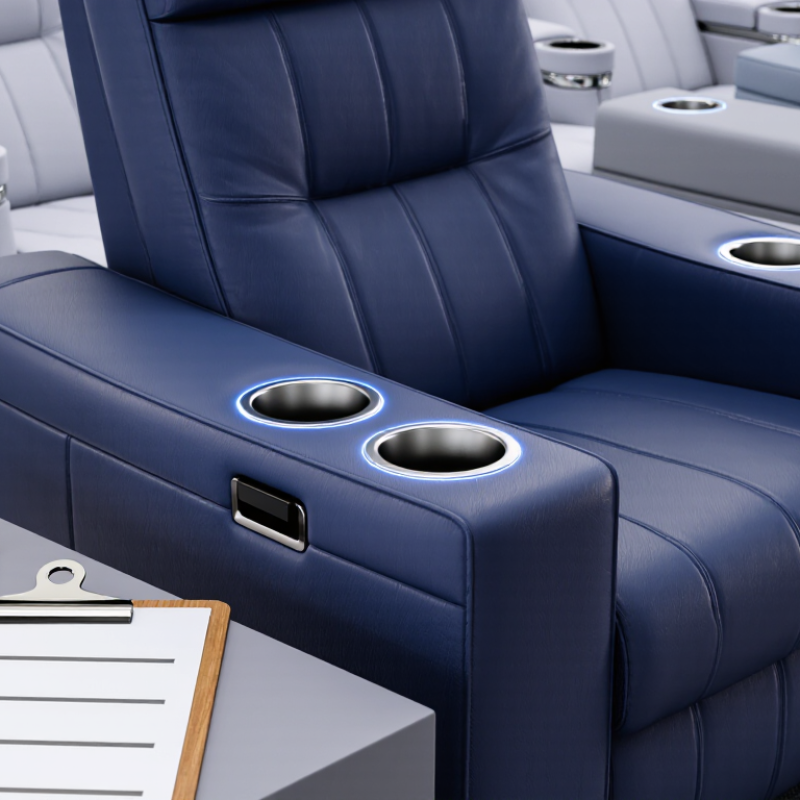
Cinema sofa cup holders may use a small thermoelectric module or another compact cooling system. The exact design varies, so check the seat’s manual before cleaning or troubleshooting. In many units, the cooling element transfers heat away from the cup well, while vents help release that heat. A blocked vent can make cooling weaker. Airflow matters. The holder may feel cool, but it is not always designed to chill a warm drink quickly. That distinction is easy to miss.
Tips: Keep the cup well clear of crumbs and sticky residue. Use a soft, slightly damp cloth, then dry the area fully. Never pour water into vents or around electrical controls. If the cup holder has a removable insert, check the manual before taking it out. Leave space around nearby vents. Small habits help.
For routine care, switch the cooling function off before wiping the holder. Check that ventilation openings remain unobstructed and listen for unusual rattling or buzzing. A little warmth near an exhaust vent can be normal, depending on the design. If cooling fades despite clear vents, stop using the function and ask qualified service staff to inspect it. It is tempting to keep testing it, but repeated operation may not reveal the cause.
Suggested preventive maintenance intervals for keeping cooling airflow clear and checking system operation. Follow the seating manufacturer’s instructions where they differ.
Regularly remove debris from the cup well and air vents. Before cleaning or inspection, switch off and disconnect the cooling system when applicable.
A cinema sofa cooling cup holder needs more than a quick wipe. Check the metal or plastic liner for dents, loose edges, and sticky residue that could block a cup from sitting level. Look around the rim and seams for cracks or moisture marks. Small details matter. A crooked cup can spill when the seat reclines.
Before inspecting cooling parts, switch off and unplug the sofa if the power connection is accessible. Check the air vents for dust, fabric fibers, or objects pressed against them. Use a soft, dry brush on the vent openings; avoid pushing debris deeper inside. Listen for changes in fan noise during normal use. A new rattle or weak airflow may signal a problem, though noise alone cannot confirm the cause. Do not open sealed electrical components. I sometimes overlook the cable route, but pinched wires deserve attention too.
Tips: Keep drinks out while inspecting. Wipe the holder with a lightly damp cloth, then dry it fully. Never pour cleaner into vents. If cooling remains uneven after basic cleaning, stop using that holder and ask a qualified technician to inspect it. A little uncertainty is better than guessing at internal repairs.
| Inspection Area | What to Check | Safe Inspection Method | Suggested Frequency | Acceptable Condition and Action |
|---|---|---|---|---|
| Cup-holder insert and rim | Look for cracks, sharp edges, loose inserts, sticky residue, or deformation. | Switch off and disconnect the seat’s power before cleaning. Wipe with a soft cloth and a mild, seat-compatible cleaner; do not pour liquid into the holder. | Visually check daily; clean after spills and as part of routine seat cleaning. | The insert is secure, smooth, and free of residue. Replace damaged parts rather than continuing to use a cracked or loose holder. |
| Cooling surface | Check for stains, corrosion, scratches, or residue that could block heat transfer or contact with the cup. | With power disconnected, wipe the surface with a soft, slightly damp cloth, then dry it completely. Avoid abrasive pads and unapproved solvents. | Weekly, and whenever a spill or visible buildup occurs. | The surface is clean and dry, with no visible corrosion or damage. Refer persistent staining or surface damage to a qualified technician. |
| Air vents and airflow openings | Check for dust, lint, wrappers, or other obstructions around ventilation slots. | Inspect the openings with a flashlight. Remove loose debris gently; do not push objects into the vents or use liquid cleaners. | Monthly; more often in dusty or high-use locations. | Openings are unobstructed. If airflow remains weak or the unit becomes unusually warm, stop using the cooling function and arrange a service check. |
| Fan, if fitted | Listen for rattling, scraping, or unusually loud operation and check for reduced airflow. | Observe the unit during a normal operating cycle without opening its housing. Keep fingers and tools away from moving parts. | Monthly, or sooner if a noise or airflow change is noticed. | Operation is steady and free of unusual noise. Disconnect power and request qualified service if the fan stalls or makes persistent abnormal sounds. |
| Power lead and connectors | Inspect accessible cables and plugs for cuts, pinching, fraying, looseness, or discoloration. | Disconnect power before inspection. Do not pull a cable to unplug it, and do not open electrical enclosures. | Monthly and after seat movement, repair work, or a reported electrical issue. | Cables and connectors are intact and firmly seated. Do not use the cooling function if wiring is damaged; refer repairs to qualified personnel. |
| Cooling performance | Confirm that the cooling function operates and compare performance with the unit’s documentation or normal baseline. | Use the normal control setting and a suitable test cup. Allow the product’s specified operating time; do not assume every model reaches the same temperature. | At commissioning, then quarterly or after a complaint. | Performance is consistent with the manufacturer’s specifications. If cooling is weak or absent, check controls and airflow, then request service if the issue continues. |
| Condensation and moisture | Look for water around the holder, beneath the seat, or near electrical connections. | Disconnect power if moisture is near wiring or electrical parts. Blot accessible moisture with a dry cloth; do not operate a wet unit. | During routine cleaning and whenever the area feels damp. | The surrounding area and accessible electrical parts are dry. Investigate recurring moisture before returning the cooling function to service. |
| Service record | Record inspection date, cleaning, reported symptoms, and any parts or service actions. | Use the venue’s maintenance log and follow the product manual for model-specific procedures and replacement parts. | After each scheduled inspection or repair. | Records are complete and any unresolved fault is clearly marked for follow-up. Do not dismantle sealed cooling or electrical components unless qualified and authorized. |
Power off the sofa before cleaning, and check its care instructions for any limits. Cooling cup holders may contain fans, wiring, or other powered parts, so never pour water directly into the well. Remove cups and loose crumbs first. A soft, dry brush can reach around the bottom seam.
For sticky drink residue, dampen a microfiber cloth with warm water and a little mild dish soap. Wring it out well; it should feel barely damp. Wipe the cup holder in small circles, then use a clean damp cloth to lift away soap. Avoid abrasive pads and strong cleaners, which can cloud plastic or damage its finish. A cotton swab helps with narrow edges. It is easy to rush this part, but residue often hides in the seam.
Mineral rings may need a few gentle passes with the soapy cloth. Don’t scrape them with metal or soak them with vinegar unless the manufacturer permits it. Dry the interior thoroughly with a lint-free cloth, then leave the holder open until fully dry. Check nearby vents for lint, but don’t push debris inside. If cooling seems weak after cleaning, stop using the holder and consult the sofa’s care guidance rather than probing its electrical parts.
Cooling cup holders combine a chilled surface, wiring, and small ventilation channels. Before cleaning, switch off the sofa and unplug it from the outlet. Wait until the holder feels cool. This simple pause reduces electrical risk and protects the cooling components. Wipe the rim and cup well with a soft, slightly damp cloth, then dry them fully. Never pour water into the holder or spray cleaner near its vents.
Check the ventilation openings for lint, crumbs, or pet hair. Remove loose debris with a dry, soft brush, moving gently across the grille. Do not push cotton swabs, pins, or other objects inside; hidden wires can be damaged. Keep cups from blocking the vents during use. If airflow weakens, the holder makes unusual sounds, or you notice a burning smell, unplug the sofa and arrange qualified service. Avoid opening the electrical housing yourself. A small grille can be easy to overlook.
Tips: Clean only when unplugged. Keep liquids away. Check vents monthly, or more often in dusty rooms. I sometimes miss the rear grille, so a phone flashlight helps reveal buildup. If you are unsure whether a part is removable, leave it in place and check the sofa’s care instructions.
Troubleshooting Cooling Problems and Preventing Wear
If a cup holder feels warm, check simple causes before assuming the cooling unit has failed. Confirm the sofa is connected to power and the holder’s control is on. Some designs need several minutes to cool. Remove the drink and check that crumbs, fabric, or a nearby cushion are not blocking the vents. Small details matter.
Unplug the sofa before cleaning. Wipe the holder with a soft, slightly damp cloth, then dry it completely. Never pour water into the cooling well or push tools through its vents. This can damage electrical parts. If cooling remains weak, let the unit rest, inspect the power connection, and consult the product instructions. A faint hum may be normal, but unusual heat, a burning smell, or repeated shutdowns are warning signs. Stop using the unit and ask a qualified service technician to inspect it.
Prevent wear with gentle habits. Lift cups instead of scraping them against the rim, and do not force oversized containers into the holder. Clean spills promptly, especially sugary ones that leave sticky residue. It is easy to blame the unit too quickly; a blocked vent may be the real cause. Still, not every problem has a simple fix. If cooling keeps fading, arrange service rather than opening the housing yourself.
Switch off and unplug the sofa. Wait until the holder feels cool. Wipe it with a soft, slightly damp cloth, then dry it fully. Keep water away from the vents.
Use a dry, soft brush to remove loose lint, crumbs, or pet hair. Brush gently across the grille. Do not insert swabs, pins, or tools.
Check them monthly, or more often in dusty rooms. A phone flashlight can help reveal debris near the rear grille. I sometimes miss that spot.
Check that the sofa has power and the holder’s control is on. Allow several minutes for cooling. Remove anything blocking the vents, such as crumbs or a nearby cushion.
Unplug the sofa before cleaning. Let the unit rest and check its power connection and care instructions. If cooling continues to fade, arrange qualified service.
A faint hum may be normal. Stop using the unit if it makes unusual sounds, becomes unusually hot, smells burnt, or shuts down repeatedly.
Lift cups instead of scraping them against the rim. Do not force oversized containers into the holder. Wipe sugary spills promptly; sticky residue can build up.
No. Keep it closed. Hidden wires may be damaged, and the cause may not be obvious. Ask a qualified service technician to inspect persistent problems.
This guide explains how to maintain cooling cup holders on cinema sofas by showing how their cooling systems work and which parts need regular attention. It covers checking the holder, cooling surfaces, vents, and visible connections for dust, spills, loose parts, or signs of wear. Routine cleaning helps remove crumbs and sticky buildup that can block airflow or reduce cooling performance. Use a soft cloth and suitable cleaning materials, and keep liquids away from electrical components.
The guide also describes safe care for electrical and ventilation parts, including disconnecting power before inspection and avoiding damage to wires or fan openings. If a holder stops cooling effectively, check for blocked vents, dirt, or an interrupted power connection before arranging qualified service. Regular inspections, gentle cleaning, and prompt attention to unusual noise or heat can help prevent common problems and extend the useful life of the cooling cup holder.
